How to Remove Silence from Video Automatically
Step-by-step guide to cut dead air and pauses from your recordings in minutes, not hours.
Quick Answer
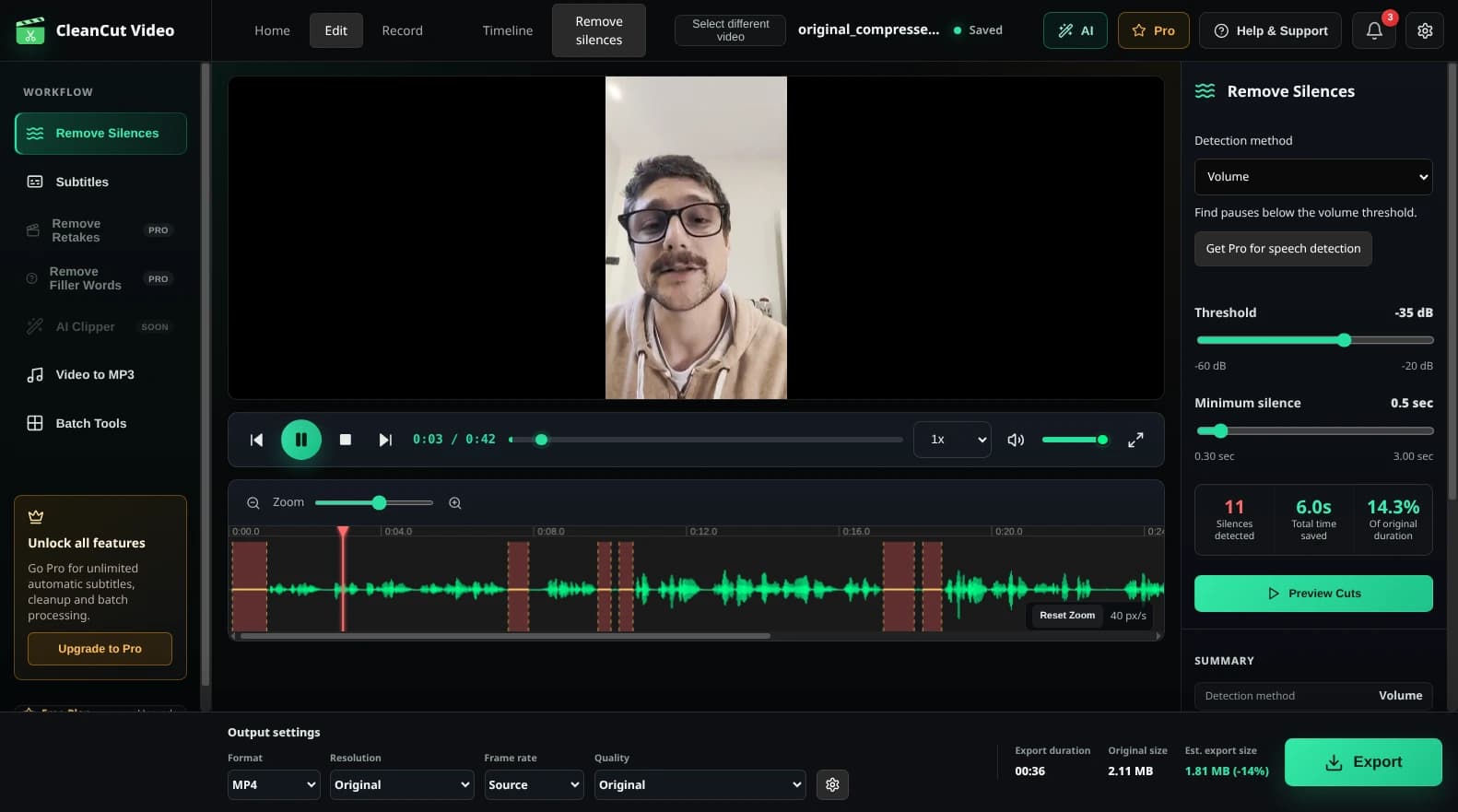
To remove silence from video automatically: (1) Download CleanCut Video, (2) Import your video file, (3) Click "Detect Silences", (4) Review the detected sections, and (5) Export. The entire process takes less than 5 minutes for most videos.
What Counts as Silence?
In video editing, "silence" refers to any section where the audio level falls below a certain threshold. This includes:
- Dead air - Complete silence when nobody is speaking
- Long pauses - Gaps between sentences or thoughts
- Awkward silences - Moments of hesitation or thinking
- Background noise only - Sections with just room tone or ambient sound
CleanCut Video lets you define what "silence" means for your content by adjusting the volume threshold (in decibels) and minimum duration (in seconds).
Step-by-Step Instructions
Download and install CleanCut Video
Download CleanCut Video for your operating system (Windows, macOS, or Linux) and complete the installation process.
Import your video
Launch CleanCut and drag-and-drop your video file into the application window, or click the import button to browse for your file.
Detect silences
Click the 'Detect Silences' button. CleanCut will analyze your video's audio and highlight all silent sections on the waveform.
Review and adjust
Preview the detected silences. Adjust the threshold and minimum duration settings if needed, or manually exclude specific silence regions you want to keep.
Export your video
Click 'Export' to create a new video file with all silences removed. Your original file remains untouched.
Ready to Remove Silence from Your Videos?
Download CleanCut Video for free and start editing faster.
Troubleshooting
Too many silences detected
If CleanCut is detecting too many sections as silence, try lowering the silence threshold (make it more negative, e.g., -40dB instead of -30dB) or increasing the minimum silence duration.
Not enough silences detected
If important pauses aren't being caught, try raising the threshold (make it less negative, e.g., -25dB instead of -35dB) or decreasing the minimum duration to catch shorter pauses.
Cuts feel too abrupt
Add padding to keep a small amount of silence before and after each speech section. This creates more natural transitions. Try 0.1-0.3 seconds of padding.
Frequently Asked Questions
Does this work with any video format?
Yes! CleanCut supports MP4, MOV, AVI, MKV, WebM, and most other common video formats.
Will this reduce video quality?
No. CleanCut uses lossless cutting, so your video quality remains exactly the same. Only the silent sections are removed.
How long does processing take?
Silence detection is nearly instant. Export time is typically 2-5x faster than your video duration on modern hardware.